
How to Create and Manage Forms with the API
Create, list, update and delete FormRobin forms and read their sessions with the API. Get a token under Settings → API, then call the /api/v1/forms endpoints.
What can I do with the Forms API?
With the Forms API you can:
- Create a form (name, folder, submit button text, email notifications)
- List your forms, 100 per page
- Get, update or delete one form
- Read a form's sessions (submissions and visits)
| To | Send |
|---|---|
| Create a form | POST /api/v1/forms |
| List your forms | GET /api/v1/forms |
| Get one form | GET /api/v1/forms/{id} |
| Update a form | PUT /api/v1/forms/{id} |
| Delete a form | DELETE /api/v1/forms/{id} |
| Read a form's sessions | GET /api/v1/forms/{id}/sessions |
Questions, design and settings are built in the form editor; the API creates the form itself. Tokens are managed under Settings → API:
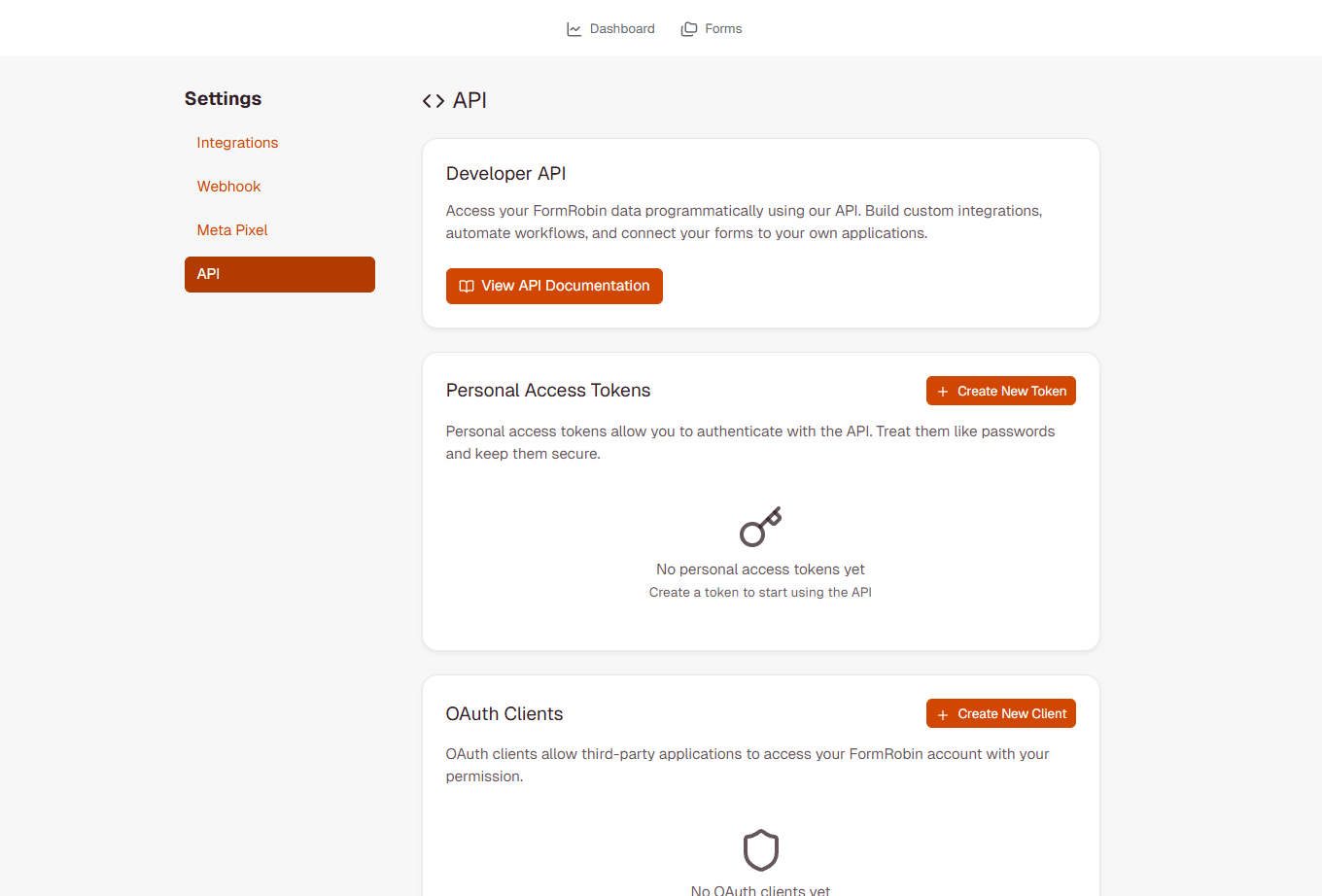
Prerequisites: a Personal Access Token or a token from the login endpoint — see the API Authentication Guide. The API is available on both plans, Free Plan and Individual Plan.
How do I create a form?
Endpoint
POST https://formrobin.com/api/v1/forms
Request Format
Authorization: Bearer YOUR_TOKEN
Content-Type: application/json

{
  "name": "Contact Form",
  "folder_id": 42,
  "data": {
    "submit_text": "Send"
  },
  "email_notifications_enabled": true
}
Which parameters can I send?
- name (required, string, up to 255 characters) - the form name
- folder_id (optional, integer or null) - a folder in your account (a folder ID that does not exist returns 422; another account's folder returns 404)
- data.submit_text (optional, string, up to 255 characters) - the submit button text (default "Submit")
- email_notifications_enabled (optional, boolean) - default
true
Success Response
HTTP 201 Created:
{
  "data": {
    "id": 123,
    "name": "Contact Form",
    "folder_id": 42,
    "email_notifications_enabled": true,
    "url": "https://formrobin.com/f/j50q4kw",
    "redirect_url": null,
    "webhook_url": null,
    "created_at": "2026-01-15T10:30:00.000000Z",
    "updated_at": "2026-01-15T10:30:00.000000Z"
  }
}
The url field is the form's public link. A form created through the API starts unpublished and has no questions yet: open it in FormRobin, add questions, then publish it with its toggle on the Forms page (see Publishing and Sharing Your Form).
Example: Creating a Form
curl -X POST https://formrobin.com/api/v1/forms \
  -H "Authorization: Bearer YOUR_TOKEN" \
  -H "Content-Type: application/json" \
  -d '{"name": "Newsletter Signup", "folder_id": 42, "data": {"submit_text": "Subscribe"}}'
How do I list all forms?
Endpoint
GET https://formrobin.com/api/v1/forms
Description
Returns your forms, newest first, 100 per page. The endpoint takes no filter, sort or search parameters; use ?page=2 (or the next link) for more pages.
Example: List Forms
curl https://formrobin.com/api/v1/forms \
  -H "Authorization: Bearer YOUR_TOKEN"
Response
{
  "data": [
    {
      "id": 123,
      "name": "Contact Form",
      "folder_id": 42,
      "email_notifications_enabled": true,
      "url": "https://formrobin.com/f/j50q4kw",
      "redirect_url": null,
      "webhook_url": null,
      "created_at": "...",
      "updated_at": "..."
    }
  ],
  "links": {
    "first": "https://formrobin.com/api/v1/forms?page=1",
    "last": "...",
    "prev": null,
    "next": null
  },
  "meta": {
    "current_page": 1,
    "last_page": 1,
    "per_page": 100,
    "total": 1,
    ...
  }
}
How do I get a specific form?
Endpoint
GET https://formrobin.com/api/v1/forms/{id}
Example
curl https://formrobin.com/api/v1/forms/123 \
  -H "Authorization: Bearer YOUR_TOKEN"
Response
The same form object as above, inside "data".
How do I update a form?
Endpoint
PUT https://formrobin.com/api/v1/forms/{id}
Request Format
{
  "name": "Contact Us",
  "data": { "submit_text": "Send Message" },
  "email_notifications_enabled": false
}
Request Parameters
Send only what you want to change:
- name (string, up to 255 characters)
- folder_id (integer or null) - a folder in your account
- data.submit_text (string, up to 255 characters)
- email_notifications_enabled (boolean)
The response is the updated form object.
Example: Update Form Name
curl -X PUT https://formrobin.com/api/v1/forms/123 \
  -H "Authorization: Bearer YOUR_TOKEN" \
  -H "Content-Type: application/json" \
  -d '{"name": "Contact Us - Updated"}'
How do I delete a form?
Endpoint
DELETE https://formrobin.com/api/v1/forms/{id}
Example
curl -X DELETE https://formrobin.com/api/v1/forms/123 \
  -H "Authorization: Bearer YOUR_TOKEN"
Response
HTTP 204 No Content. The form and its responses disappear from your account, and deleted forms cannot be restored from FormRobin. Export responses first if you need them (see Exporting Form Data as CSV).
How do I get form sessions?
Endpoint
GET https://formrobin.com/api/v1/forms/{id}/sessions
Which query parameters are supported?
- completed (optional, boolean) -
truereturns only submitted sessions, newest submission first. Without it you get every session, newest first — including visits where someone opened the form but did not submit (theircompleted_atis null).
Example: Get All Sessions
curl https://formrobin.com/api/v1/forms/123/sessions \
  -H "Authorization: Bearer YOUR_TOKEN"
Example: Get Submitted Sessions Only
curl "https://formrobin.com/api/v1/forms/123/sessions?completed=true" \
  -H "Authorization: Bearer YOUR_TOKEN"
Response
{
  "data": [
    {
      "id": 456,
      "form_id": 123,
      "form_field_responses": [
        { "id": 789, "form_session_id": 456, "form_field_id": 10,
          "form_field_label": "Email Address", "value": "user@example.com" }
      ],
      "completed_at": "2026-01-15T10:35:00.000000Z",
      "utm_source": null, "utm_medium": null, "utm_campaign": null,
      "utm_term": null, "utm_content": null,
      "referrer_url": null,
      "landing_page_url": "https://formrobin.com/f/j50q4kw",
      "device_type": "desktop", "browser_name": "Chrome", "browser_version": "120.0",
      "operating_system": "Windows", "ip_address": "203.0.113.7",
      "created_at": "2026-01-15T10:30:00.000000Z", "updated_at": "2026-01-15T10:35:00.000000Z"
    }
  ],
  "links": { ... },
  "meta": { "current_page": 1, "per_page": 100, "total": 42, ... }
}
Sessions are paginated 100 per page. Field descriptions: FormRobin API: Getting Started.
How do form URLs work?
Every form's public link is https://formrobin.com/f/{code}, where the code is generated from the form's ID (lowercase letters and numbers, for example j50q4kw). The API returns it in url; it cannot be customized.
Best Practices
- Store form IDs returned by the API for later updates
- Page through results with
?page=Nor thenextlink - Use folders to keep API-created forms together
- Check status codes and the
errorsobject on 422 responses
What are the limitations?
- Questions: the API does not create or edit questions; build them in the form editor
- Publishing: API-created forms start unpublished; publish them in FormRobin
- One form per request: there are no bulk endpoints
- No filtering or sorting on the list endpoint
- Ownership: only forms you have access to
Which error responses can I get?
- 401 Unauthorized - missing, expired or deleted token:
{"message": "Unauthenticated."} - 403 Forbidden - the form exists but you have no access to it:
{"message": "This action is unauthorized."} - 404 Not Found - no form with that ID, or a
folder_idthat belongs to another account - 422 Unprocessable Entity - validation failed; the
errorsobject names each field, for example"name": ["The name field is required."] - 429 Too Many Requests - more than 60 requests in a minute
Troubleshooting
"The name field is required."
- Include
namein the JSON body and sendContent-Type: application/json.
The folder_id is rejected
- Use the ID of a folder in your own account, or
nullfor no folder.
The form has no questions, or its link shows "Page Not Found"
- The API creates an empty, unpublished form. Add questions in the form editor (see Creating Your First Form Manually), then turn on its toggle on the Forms page.
403 when deleting or updating a form
- You can change only forms you have access to. Check the form ID with
GET /api/v1/forms.
Still stuck? Contact support at support@formrobin.com with the request method, URL and body (without your token) and the full response.
Frequently Asked Questions
Can I create questions via the API?
No. The API creates the form (name, folder, submit text, notifications); add questions in the form editor.
Can I duplicate a form via the API?
No. Use Duplicate in the form's menu on the Forms page, which also copies its questions.
What happens to responses when I delete a form?
They disappear from your account together with the form, and the form cannot be restored from FormRobin. Export them first.
Can I retrieve submissions via the API?
Yes. GET /api/v1/forms/{id}/sessions?completed=true returns submitted sessions with every answer, source and device details. For a spreadsheet, use Export CSV on the form's Sessions page.