
How to Send Form Submissions to a Webhook
FormRobin webhooks send every completed form submission to your own URL as JSON. On the Individual Plan, add the URL under Settings → Webhook.
What Are Webhooks?
Webhooks allow FormRobin to automatically send form submission data to your custom URL endpoint whenever someone submits a form. This enables you to:
- Connect FormRobin to custom applications
- Trigger automated workflows
- Send data to your own database or CRM
- Build custom integrations with any web service
- Process submissions in real-time
Plan Requirement: Webhooks are available on the Individual Plan ($19 lifetime deal) only.
| Webhooks at a glance | |
|---|---|
| Plan | Individual Plan |
| Where to set it | Settings → Webhook |
| Scope | One URL for all forms in your account |
| Request | POST with a JSON body |
| Sent when | A form submission is completed |
| Time limits | Connect within 5 seconds, respond within 10 seconds |
| Retries | None |
To pull submissions from your own code instead, use the FormRobin API. To connect other apps without code, see Connecting FormRobin to Zapier.
How Webhooks Work
- User submits a form on FormRobin
- FormRobin processes the submission
- FormRobin sends a POST request to your webhook URL
- Your server receives the submission data as JSON
- Your application processes the data
Note: Webhooks send data in real-time, typically within seconds of form submission.
How do I set up a webhook?
Step 1: Prepare Your Webhook Endpoint
Before configuring webhooks in FormRobin, you need a URL endpoint that can:
- Accept POST requests
- Process JSON payloads
- Respond within 10 seconds
- Use HTTPS (recommended for security)
Step 2: Configure Webhook URL in FormRobin
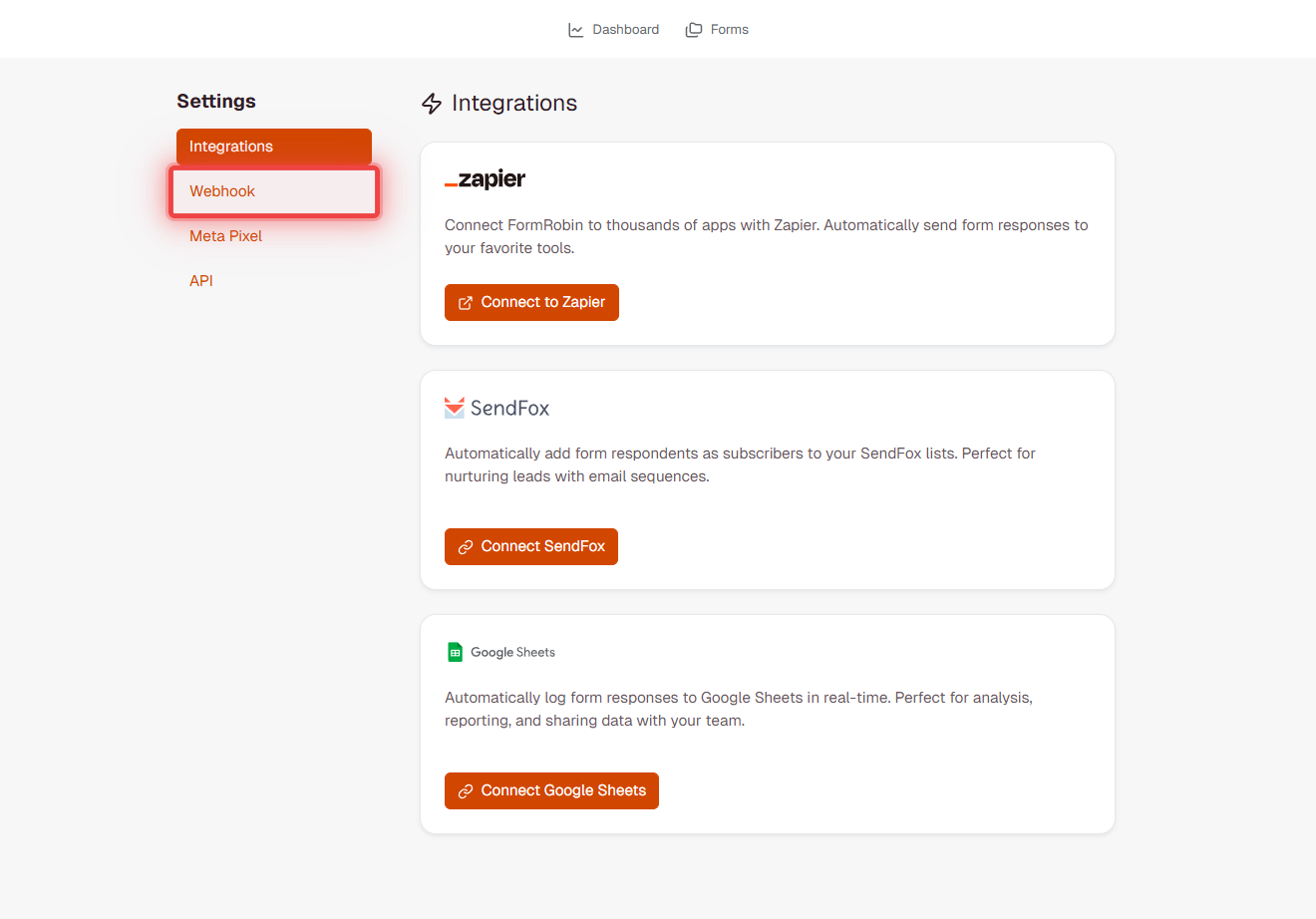
- Log in to FormRobin.
- Open the account menu in the top right and select Settings.
- Click Webhook in the Settings sidebar.
- Enter your URL in Webhook URL (a valid URL, up to 255 characters).
- Click Save Webhook Settings.
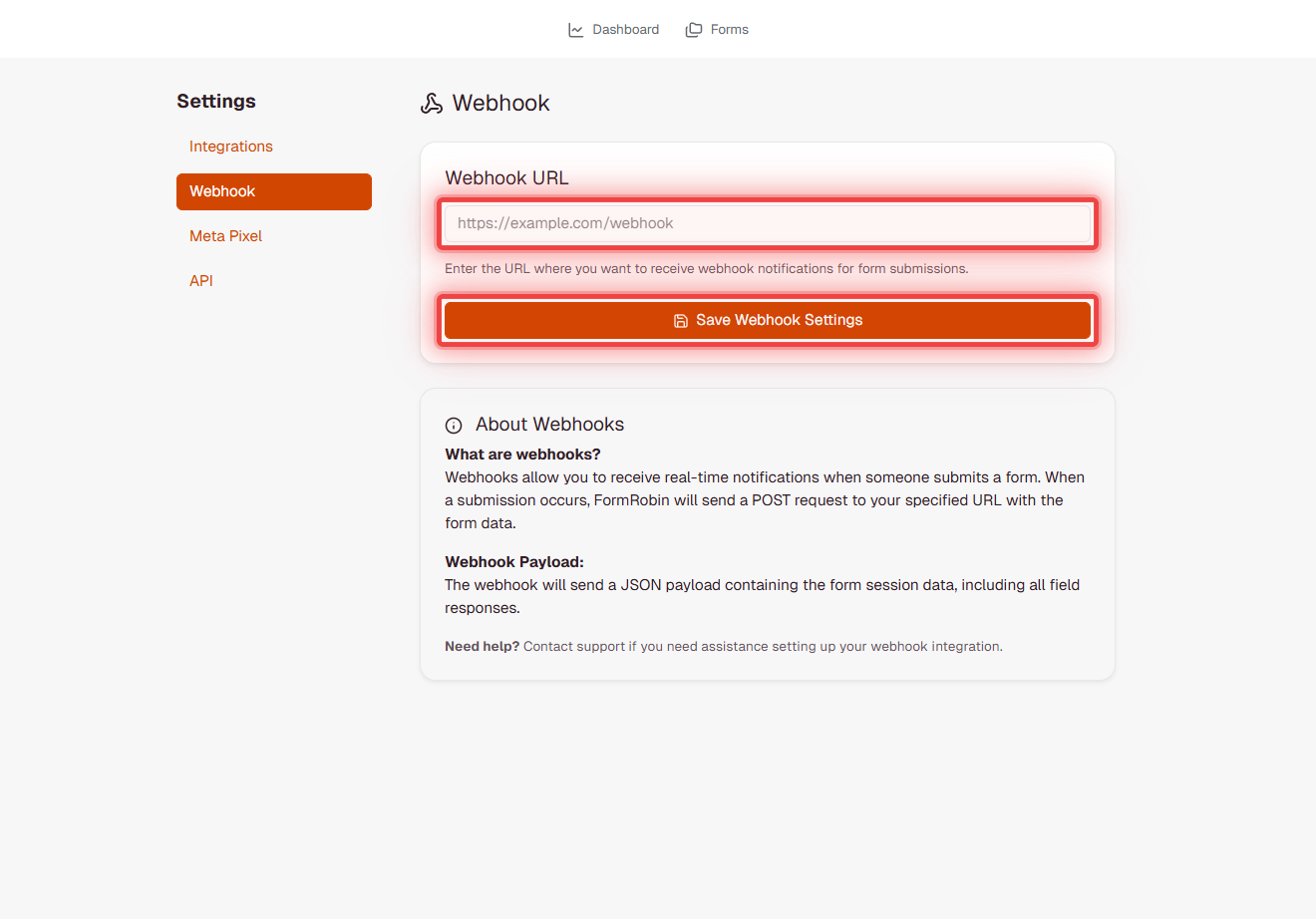
Important: The webhook URL applies to ALL forms in your account. Every form submission will be sent to this URL.
What does the webhook payload contain?
FormRobin sends form submission data as a JSON payload in this format:
{
  "id": 456,
  "form_id": 123,
  "completed_at": "2024-10-21T12:34:56.000000Z",
  "form_field_responses": [
    {
      "id": 789,
      "form_session_id": 456,
      "form_field_id": 10,
      "form_field_label": "Email Address",
      "value": "user@example.com"
    },
    {
      "id": 790,
      "form_session_id": 456,
      "form_field_id": 11,
      "form_field_label": "Full Name",
      "value": "John Doe"
    }
  ],
  "utm_source": "google",
  "utm_medium": "cpc",
  "utm_campaign": "fall-campaign",
  "utm_term": null,
  "utm_content": null,
  "referrer_url": "https://example.com/page",
  "landing_page_url": "https://formrobin.com/f/abc123?utm_source=google",
  "device_type": "desktop",
  "browser_name": "Chrome",
  "browser_version": "118.0",
  "operating_system": "Windows",
  "ip_address": "192.168.1.1",
  "created_at": "2024-10-21T12:34:56.000000Z",
  "updated_at": "2024-10-21T12:34:56.000000Z"
}
Payload Field Descriptions
- id: Unique submission ID
- form_id: ID of the form that was submitted
- form_field_responses: Array of answer objects. Each object includes id (answer ID), form_session_id, form_field_id, form_field_label (the question label as entered in the editor, so it can contain formatting such as
<b>tags), and value (the submitted value — a string for most questions, or an array for questions with several selected options) - completed_at: Timestamp when submission was completed
- utm_*: UTM parameters from the URL the form was opened with (null when the URL had none)
- referrer_url: the page the visitor came from, when their browser sent it (for an embedded form, usually the page it is embedded on)
- landing_page_url: the full URL the form was loaded from, including its query string
- device_type: Device category (desktop, mobile, tablet)
- browser_name: Browser used for submission
- browser_version: Browser version number
- operating_system: User's OS
- ip_address: User's IP address
- created_at: Record creation timestamp
- updated_at: Record update timestamp
HTTP Request Headers
FormRobin sends webhooks with these headers:
- Content-Type: application/json
- User-Agent: FormRobin-Webhooks/1.0
How should my endpoint respond?
Your webhook endpoint should:
- Respond with HTTP 200 (OK) status code
- Respond within 10 seconds (timeout limit)
- Process the data asynchronously if needed
- Log received webhooks for debugging
Note: FormRobin does not retry failed webhooks. Ensure your endpoint is reliable and responds quickly.
How do I test my webhook?
- Set up a test endpoint (use tools like webhook.site or requestbin.com)
- Configure the test URL in FormRobin webhook settings
- Submit a test form
- Verify the payload is received at your endpoint
- Check that all expected data is included
- Verify your endpoint responds with 200 OK
Helpful Testing Tools
- webhook.site - Free webhook testing and inspection
- requestbin.com - Capture and inspect HTTP requests
- ngrok.com - Expose local development server for testing
Security Best Practices
- Use HTTPS: Always use secure URLs for webhook endpoints
- Validate payloads: Verify data structure and content
- Rate limiting: Protect your endpoint from abuse
- Authentication: Consider adding authentication tokens to your webhook URL (e.g., as a query parameter or path segment)
- Log all requests: Keep an audit trail of received webhooks
Common Use Cases
- CRM Integration: Automatically add leads to your CRM
- Email Marketing: Add subscribers to your email list
- Team Notifications: Forward submissions to chat platforms like Slack, Discord, Microsoft Teams, or Flock via an automation service such as Zapier or Make (see Compatibility below)
- Database Storage: Save submissions to your own database
- Order Processing: Trigger order fulfillment workflows
- Analytics: Send data to custom analytics platforms
Compatibility
FormRobin webhooks send a standard JSON payload and work out-of-the-box with any service that accepts generic JSON POST requests.
Works Natively
- Automation platforms: Zapier, Make.com, n8n, Pabbly Connect, Pipedream, ActivePieces
- Testing tools: webhook.site, RequestBin, Beeceptor
- Custom endpoints: Any server, serverless function, or API that accepts
Content-Type: application/json
Chat Platforms Require an Intermediary
Slack, Discord, Microsoft Teams, Flock, and Google Chat all expose "Incoming Webhook" URLs, but those URLs expect a chat-message-shaped payload (for example, {"text": "Hello"}) rather than a generic JSON body. If you paste a chat platform webhook URL directly into FormRobin, the submission will fire but the chat platform will reject it with an HTTP 400 response.
To route submissions into a chat channel, use an intermediary that transforms FormRobin's JSON into the chat platform's expected format:
- Set FormRobin's Webhook URL to a Zapier, Make, n8n, or Pipedream inbound URL.
- In the intermediary, construct a summary string (for example, "New submission from {email}: {message}").
- Configure the intermediary to POST
{"text": "..."}(or the platform's equivalent format) to your chat platform's webhook URL.
For Slack and Discord specifically, Zapier offers first-class actions ("Send Channel Message") that handle the payload transformation automatically — see Connecting FormRobin to Zapier.
Webhook Limitations
- One URL per account: All forms send to the same webhook URL
- No retries: Failed webhooks are not automatically retried
- 10-second timeout: Your endpoint must accept the connection within 5 seconds and respond within 10 seconds
- Individual Plan only: Requires the Individual Plan
- No signature verification: FormRobin does not sign webhook payloads
- Generic JSON only: FormRobin sends a fixed payload shape — chat platform webhooks (Slack, Discord, Teams, Flock) need an intermediary
Troubleshooting Webhooks
Webhook URL will not save.
Ensure you have the Individual Plan. Verify the URL is valid and properly formatted (http:// or https://). Check that the URL is under 255 characters.
Webhooks not being received.
Verify the webhook URL is correct in Settings -> Webhook. Test your endpoint with tools like webhook.site to confirm it is accessible. Check your server logs for incoming requests. Ensure your endpoint accepts POST requests.
Endpoint returns HTTP 400 Bad Request.
Your endpoint is receiving the webhook but rejecting the payload format. This commonly happens with Slack, Discord, Microsoft Teams, or Flock chat webhooks because they require a chat-message-shaped payload (such as {"text": "..."}) instead of a generic JSON body. Use Zapier, Make, or another automation service as an intermediary — see the Compatibility section.
Payload data is missing fields.
Fields are null when there was no data for them — for example utm_term when the form URL had no utm_term parameter, or referrer_url when the browser did not send one. To receive UTM values, share the form link with the UTM parameters added (see Using Source Tracking and UTM Parameters).
Webhook times out.
Ensure your endpoint responds within 10 seconds. Move slow processing to background jobs. Return 200 OK immediately and process data asynchronously.
Need different webhook URLs for different forms.
Use the form_id in the payload to route data appropriately within your webhook handler. Or use the Zapier integration for more flexible per-form integrations.
Frequently Asked Questions
Can I use FormRobin webhooks with Slack, Discord, Microsoft Teams, or Flock?
Not directly. Those platforms' incoming webhooks expect a chat-message payload (usually {"text": "..."}), while FormRobin sends a generic JSON payload with form submission data. Use an automation service such as Zapier, Make, n8n, or Pipedream as an intermediary to transform the payload. See the Compatibility section above.
Are webhooks sent for incomplete or abandoned forms?
No. Webhooks only trigger when forms are successfully submitted and completed.
What happens if my webhook endpoint is down?
FormRobin attempts to send the webhook once. If your endpoint is down or does not respond within 10 seconds, the webhook is lost. FormRobin does not retry failed webhooks.
Do webhooks include file uploads?
No. The payload does not contain uploaded files or links to them. To get a file, open the form's Sessions page in FormRobin and download it from the submission.
Does enabling a webhook affect my other integrations, like SendFox or Google Sheets?
No. Webhooks, the SendFox integration, and Google Sheets sync each run independently. Enabling a webhook does not disable, delay, or interfere with your existing integrations, and all of them can run at the same time on the same form.
Need help setting up webhooks? Email support@formrobin.com with your webhook URL and the time of a test submission.